Wiremod, for dummies.
6 replies · 3 participants
Jan 18, 2010, 01:26 AM#1
Request for thread to be sticky'd.
Wiremod, for dummies.
This is what you need to know in order to download and install the latest build of Wiremod and also how to keep it current and up to date. Included with this guide are some simple tutorials to get you go going, like what Wiremod is, what it does and how to use it. I will also be touching upon a little bit of Expression 2. Don't expect anything too advanced from me though, if you want help with some of the more advanced features of Expression 2, you are advised to consult either Gobo or Moglizorz.
What Wiremod is and what it does
Wiremod, in short is a mod package that allows you to add extra functionality to the contraptions you build in Garry's Mod, and helps you break them free from the limited methods of normal control via the numpad. As you are probably aware, only so many contraptions can be bound to the numpad, whereas Wiremod allows for limitless contraptions operable by various methods that are not dependant on the numpad. For instance, you can build a vehicle with working steering and acceleration mechanisms, and then bind those mechanisms to your WASD (and more) keys via the use of a Pod Controller module, you would get in the vehicle's seat and hey presto, the controls are identical to a HL2 jeep.
Build motion/proximity sensetive doors that open automatically based on the presense of a player, take server and entity data and put it to use in Expression 2 scripts - remotely manipulating props, the chatbox and more, even make entire circuit boards or even computer-like systems to operate a single contraption from the ground up. The basics of which are the taking and linking up of multiple inputs and outputs of contraptions, physics controllers and wire modules. The possibilities of which, are indeed, absolutely enormous and endless, and you are only limited by your own knowledge and imagination.
Here's is one of my better examples of what Wiremod and Expression 2 combined, can do. The control panel operates many aspects of this, a rollercoster. It is used to load and unload the passengers, engage the ride car in and out of ready position, start and automate the entire operation of the ride, and lastly allows the transfering of extra cars on and off the track. All the data needed to perform these operations is grabbed from the many control modules on the right, the internal values of these modules, for example wire hydraulic length controllers, can be altered by Expression 2 scripts and all sorts of other things.

Download and install Tortoise
To download and install, you first require an application called TortoiseSVN. Tortoise is simply an SVN client, a bit like how Firefox is to web pages. There is nothing complicated in downloading, installing it, or using it. All it requires is some common sense like all other kinds of programs. SVN stands for Subversion, which is a version control protocol. Developers use Subversion to maintain current and historical versions of files such as source code, web pages, and documentation .
Since Wiremod is always in constant development, its users and developers require a common method of keeping up to date, without having to use Install/Uninstall wizards and such - Subversion takes care of all that, and decides what parts of it you do and don't need, based on the contents of the server repository. Summarised in the simplest way possible, it basically mirrors the contents of the project's server repository onto your hard drive, while automatically deleting/overwriting what content might be updated or made redundant.
TortoiseSVN can be downloaded for free from http://tortoisesvn.net/downloads. Only download the one that is the most up to date and corresponds to your native language and system architecture (32/64 bit). If you're not sure which one to get then choose the 32 bit download. After you have done that, install the program. I'm not going to guide you through the installation process as it is 'not part of this test'. Once the program is downloaded and installed, you will need to create a folder in your garrysmod/addons folder called wiremod or something.
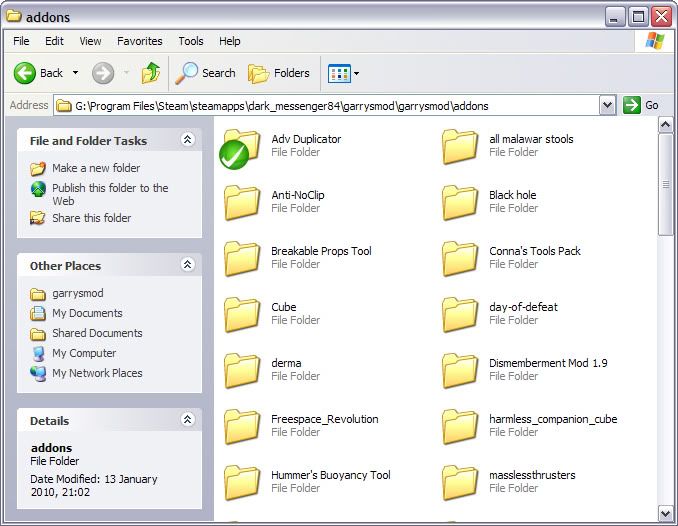
Normally located at: 'X:\Program Files\Steam\steamapps\<username>\garrysmod\garrysmod\addons' - Where X is the letter of the hard drive where your Steam installation is located and where <username> is your Steam username, of course.
Where you should be at: (Yes, I STILL use XP.)
Downloading Wiremod
Right click on the new wiremod folder you've just created, and right-click it to bring up the context menu, then select from the list of options.
A window will appear with a text bar at the top asking you for the location (URL) of the repository, here you need to copy and paste the URL 'https://wiremod.svn.sourceforge.net/svnroot/wiremod/trunk/' (without the quote marks) into that box and confirm it. Don't change any of the default options, just click on OK. From here, the SVN client will do the rest, and you will see an increasing list of files that have been downloaded so far appear in the log window. Now, depending on your connection speed, go and do something else while you wait. The size of the download is over 100mb.
Installing Wiremod
Once the package has finished downloading, open the wiremod folder and then cut and paste only these three folders, which are overlaid with green checkmarks: 'Adv Duplicator', 'wire' and 'wire model pack 1', up into the root of your Garry's Mod addons folder. This will not break the SVN links to the server repository because they will automatically change to compliment the location of those folders on the server.
Once you've done this, delete the original folder you downloaded the wiremod package into. From now one, whenever you need to update next time then you will need to right-click the relevant checkmarked folder and select from the context menu. The process of updating will commence automatically. The folder structure/layout should look a little like this now (minus the zip files).
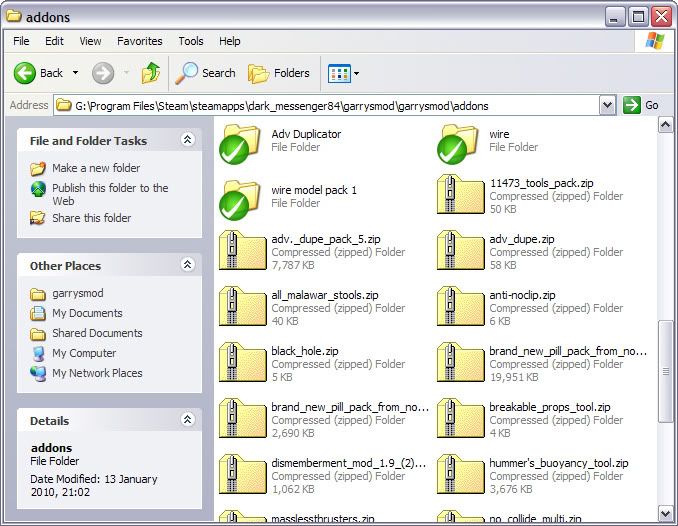
That is wiremod fully installed, although It WILL require a full Garry's Mod restart to take effect. Don't expect it to switch on like a battery powered sex aid, it doesn't work like that.
It is getting late for me now and I will continue the tutorial at some point tomorrow evening when I come home from work. Expect to see a lot of effort go into this.
Wiremod, for dummies.
This is what you need to know in order to download and install the latest build of Wiremod and also how to keep it current and up to date. Included with this guide are some simple tutorials to get you go going, like what Wiremod is, what it does and how to use it. I will also be touching upon a little bit of Expression 2. Don't expect anything too advanced from me though, if you want help with some of the more advanced features of Expression 2, you are advised to consult either Gobo or Moglizorz.
What Wiremod is and what it does
Wiremod, in short is a mod package that allows you to add extra functionality to the contraptions you build in Garry's Mod, and helps you break them free from the limited methods of normal control via the numpad. As you are probably aware, only so many contraptions can be bound to the numpad, whereas Wiremod allows for limitless contraptions operable by various methods that are not dependant on the numpad. For instance, you can build a vehicle with working steering and acceleration mechanisms, and then bind those mechanisms to your WASD (and more) keys via the use of a Pod Controller module, you would get in the vehicle's seat and hey presto, the controls are identical to a HL2 jeep.
Build motion/proximity sensetive doors that open automatically based on the presense of a player, take server and entity data and put it to use in Expression 2 scripts - remotely manipulating props, the chatbox and more, even make entire circuit boards or even computer-like systems to operate a single contraption from the ground up. The basics of which are the taking and linking up of multiple inputs and outputs of contraptions, physics controllers and wire modules. The possibilities of which, are indeed, absolutely enormous and endless, and you are only limited by your own knowledge and imagination.
Here's is one of my better examples of what Wiremod and Expression 2 combined, can do. The control panel operates many aspects of this, a rollercoster. It is used to load and unload the passengers, engage the ride car in and out of ready position, start and automate the entire operation of the ride, and lastly allows the transfering of extra cars on and off the track. All the data needed to perform these operations is grabbed from the many control modules on the right, the internal values of these modules, for example wire hydraulic length controllers, can be altered by Expression 2 scripts and all sorts of other things.
Download and install Tortoise
To download and install, you first require an application called TortoiseSVN. Tortoise is simply an SVN client, a bit like how Firefox is to web pages. There is nothing complicated in downloading, installing it, or using it. All it requires is some common sense like all other kinds of programs. SVN stands for Subversion, which is a version control protocol. Developers use Subversion to maintain current and historical versions of files such as source code, web pages, and documentation .
Since Wiremod is always in constant development, its users and developers require a common method of keeping up to date, without having to use Install/Uninstall wizards and such - Subversion takes care of all that, and decides what parts of it you do and don't need, based on the contents of the server repository. Summarised in the simplest way possible, it basically mirrors the contents of the project's server repository onto your hard drive, while automatically deleting/overwriting what content might be updated or made redundant.
TortoiseSVN can be downloaded for free from http://tortoisesvn.net/downloads. Only download the one that is the most up to date and corresponds to your native language and system architecture (32/64 bit). If you're not sure which one to get then choose the 32 bit download. After you have done that, install the program. I'm not going to guide you through the installation process as it is 'not part of this test'. Once the program is downloaded and installed, you will need to create a folder in your garrysmod/addons folder called wiremod or something.
Normally located at: 'X:\Program Files\Steam\steamapps\<username>\garrysmod\garrysmod\addons' - Where X is the letter of the hard drive where your Steam installation is located and where <username> is your Steam username, of course.
Where you should be at: (Yes, I STILL use XP.)
Downloading Wiremod
Right click on the new wiremod folder you've just created, and right-click it to bring up the context menu, then select
from the list of options. A window will appear with a text bar at the top asking you for the location (URL) of the repository, here you need to copy and paste the URL 'https://wiremod.svn.sourceforge.net/svnroot/wiremod/trunk/' (without the quote marks) into that box and confirm it. Don't change any of the default options, just click on OK. From here, the SVN client will do the rest, and you will see an increasing list of files that have been downloaded so far appear in the log window. Now, depending on your connection speed, go and do something else while you wait. The size of the download is over 100mb.
Installing Wiremod
Once the package has finished downloading, open the wiremod folder and then cut and paste only these three folders, which are overlaid with green checkmarks: 'Adv Duplicator', 'wire' and 'wire model pack 1', up into the root of your Garry's Mod addons folder. This will not break the SVN links to the server repository because they will automatically change to compliment the location of those folders on the server.
Once you've done this, delete the original folder you downloaded the wiremod package into. From now one, whenever you need to update next time then you will need to right-click the relevant checkmarked folder and select
from the context menu. The process of updating will commence automatically. The folder structure/layout should look a little like this now (minus the zip files).That is wiremod fully installed, although It WILL require a full Garry's Mod restart to take effect. Don't expect it to switch on like a battery powered sex aid, it doesn't work like that.
It is getting late for me now and I will continue the tutorial at some point tomorrow evening when I come home from work. Expect to see a lot of effort go into this.
Jan 18, 2010, 05:00 PM#2
[This post has been redacted in the archive]
Jan 19, 2010, 03:10 AM#3
if you want help with some of the more advanced features of Expression 2, you are advised to consult Moglizorz.
Mogli is a scrawny little noob. SRSLY.

P.S.
I lost a tissue up my sleeve.

Jan 19, 2010, 05:50 PM#4
[This post has been redacted in the archive]
Jan 20, 2010, 10:49 PM#5
if you want help with some of the more advanced features of Expression 2, you are advised to consult Moglizorz.
Mogli is a scrawny little noob. SRSLY.
P.S.
I lost a tissue up my sleeve.
I've referenced you in the tut.
Jan 21, 2010, 02:55 AM#6
if you want help with some of the more advanced features of Expression 2, you are advised to consult Moglizorz.
Mogli is a scrawny little noob. SRSLY.
P.S.
I lost a tissue up my sleeve.
I've referenced you in the tut.
lol.
I thank thee, but that wasn't the intended message, I was just being FOOLISH.

However, my name does look cozy there.